 FileMakerCoder
Who this is for.
Three people usually open a page like this:
- The owner, working out whether this is solid engineering or a risk you'll regret.
- Your IT person, or the friend who knows computers, checking what it's built from.
- Me — it's the answer I'd give on a triage call anyway, so you don't need the call to get it.
It's written so all three get a straight answer. The homepage doesn't need a diagram of the parts; the proof lives here.
What an All-Weather System is.
An All-Weather System is what I call this pattern: FileMaker at the core, common web tools around it, built to keep working through good years and bad, vendor changes and rising costs.
In plain terms: FileMaker keeps your data and the rules your business runs on. Web screens give it reach — public pages, forms, dashboards, connections to other systems — without ever moving your data.
The two patterns.
Almost everything I build past FileMaker is one of two shapes. Both keep the real records in FileMaker; they differ only in which direction the data flows.
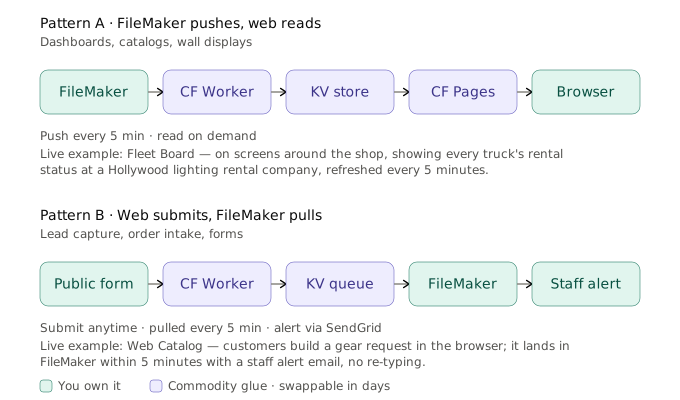
Pattern A — FileMaker pushes, the web reads.
FileMaker sends its data out to a small cloud endpoint on a schedule — every five minutes by default, and the interval is tunable to how fresh the data needs to be. A web page reads from there. This is the shape for dashboards, kiosks, catalogs, status boards: anything people need to look at.
Live example — a fleet board. A Hollywood lighting rental company with a mixed fleet runs every truck's rental status on screens around the shop, driven by real FileMaker data, refreshed every five minutes. Live since September 2026. Staff see a live board; the real records never leave FileMaker.
Pattern B — the web submits, FileMaker pulls.
A public form posts to a cloud endpoint, where submissions wait in a queue. FileMaker pulls the queue on a schedule and processes each one — writing records, sending alerts. This is the shape for lead capture, order intake, any form the outside world fills in.
Live example — a web catalog. At the same company, customers build a gear request in the browser and submit; it lands in FileMaker within five minutes with a staff alert email, and nobody re-types anything.
Every piece, what it's for, and what you own.
Here's the honest-broker part: for each piece, whether it's yours outright, a swappable dependency, or the one thing that's real work to move.
| Piece | What it does | What you own |
|---|---|---|
| FileMaker Pro + Server | Your data, your business logic, and the interface your staff already knows. The system of record. | Yours. The data exports cleanly and the logic is native FileMaker. It's a vendor platform, but not a lock-in: your data lifts out. |
| Insert from URL · JSON · Perform Script on Server | FileMaker's own way to speak HTTP and JSON, and to offload heavy work to the server. | Yours. Native FileMaker features. |
| MBS & 360Works Email plugins | Extra muscle inside the file: clipboard, files, images, and email at scale. | Dependency — commercial plugins that do jobs native FileMaker doesn't do well. Replaceable by writing custom code or swapping to a similar plugin, but not free-and-swappable the way the web pieces are. |
| Cloudflare Workers | Small JavaScript endpoints that sit between FileMaker and the web and handle each request. | Glue you could rewrite — small, well-defined; a few days to move to any small server or another host. |
| Cloudflare KV | The shared cubby where FileMaker drops data for the web to read, or where web submissions wait for FileMaker to pull them. | Vendor-specific. The one piece that's real work to move — the KV API is Cloudflare's own. |
| Cloudflare Pages | Free, fast, global hosting for the pages. | Dependency — any static host works. |
| Vanilla HTML / CSS / JavaScript | The screens themselves — one self-contained file per surface. | Yours outright. Portable to any host, readable by anyone. |
| SendGrid | Sends the transactional email — alerts, confirmations — with real deliverability. | Dependency — swap in any SMTP provider. |
The short version: your FileMaker data and the screens people use are yours outright. The middle is either native FileMaker or commodity glue that swaps out in days. Only one piece — Cloudflare's KV store — takes real effort to move, and I'll flag it up front.
Why these choices, specifically.
One principle drives the rest: build just enough, then stop. Fewer moving parts isn't a side effect — it's the goal. A part that isn't there can't break, can't need patching, and can't bill you; a small set of pieces is what stays reliable. Two specific choices follow from it:
Cloudflare, not a big cloud platform. Workers and Pages put FileMaker on the web for next to nothing at small-business scale — a generous free tier, global speed, and pieces small enough to move elsewhere if you ever had to. You don't need the weight of AWS to put a form and a dashboard on the web.
Plain HTML, CSS, and JavaScript, not a framework. No React, no build step, no npm churn. Anyone can read it, and it hands off cleanly. If one surface ever needs a framework, that switch stays contained to that surface.
What this does not change.
- Your data stays in FileMaker — still where the real records live.
- Your existing scripts, layouts, and workflows keep working.
- FileMaker skills still apply — the new layer is thin, and JavaScript only shows up where the web page lives.
- Undoing it is easy. If a cloud piece fails, FileMaker is untouched — there's no "we can't get to our data" scenario.
Who can see what.
The public-facing pages show only what you choose to send out — nothing else in FileMaker is exposed. When a page needs a login, the check happens in the web piece, before anything reaches FileMaker. And the cubby between the web and FileMaker only passes messages along: submissions go through it into FileMaker instead of staying there.
What it costs to run.
The cloud layer is inexpensive at the volume most small businesses run. A live deployment like the boards and forms above runs on cloud services billed to your own account — normal traffic usually stays inside the free tiers, and outbound email is usually the only line that costs anything at all. Build cost is a separate conversation; the running cost stays small.
The theory behind the pattern.
This "database stays put, interface layer moves to where people are" idea isn't specific to FileMaker — it's where software in general is heading. I wrote a book about it. Here's how The Last Interface connects to what I build.